Friday, January 21, 2011

MOTOROLA XOOM Zooms


MOTOROLA XOOM got revealed by the company during CES of year 2011. This was the much awaited tablet of Motorola Android product.

This tablet is already in demand by many customers. Experts and analysts say that this latest and attractive Motorola product is the best competitor to the already exhisting tablet of Apple Inc known as iPad. Motorola Xoom specifications include a dual-core processor known as Nvidia Tegra 2 with two chips of 1GHz. The resolution of this Motorola tablet is 1280 x 800 supportive and the screen size is 10.1 inches.

Motorola Xoom’s dual-core chipset need power to tablet operation as well as to video streaming and playing would definitely be provided by this chipset. There are no front-end buttons in this Motorola tablet and this could be because of touch screen compatibility of this product.

The shape of this latest Motorola tablet is being described as closely relative to the iPad tablet but the black bezel of Xoom is little thinner comparatively from iPad. Xoom also has a front-facing camera. This front-facing camera of the Motorola Xoom is of 5MP which is also having equipped with dual flash light that falls under LED flash category.

Introducing NINTENDO 3DS – A perfect gaming device


For gamers , NINTENDO has always been a brand they are looking for , and with the launch of NINTENDO 3DS on march 2011 it will be proved once again. With the 3DS technology the company has able to create 3D graphics without any glasses , which will surely give gamers a reason to buy this gadget.


The NINTENDO 3DS has 3.53 inch widescreen with LCD display , along with 3.02 inch LCD display with Touch Screen. The device will include 3 camera’s 0.3 mega pixel each with one inside and two outside. The hardware is designed so that even when the device is not in use, it can automatically exchange data with other Nintendo 3DS systems or receive data via the Internet while in sleep mode. Stereo speakers positioned to the left and right of the top screen.

The device also provides 2.4 GHz bandwidth and with that multiple Nintendo 3DS systems can connect via a local wireless connection to let users communicate or enjoy competitive game play. It also contains a ‘Slide Pad” that allows 360-degree analog input.

Overall i will give NINTENDO 3DS 4.5/5 rating before its launch.So now its time for the gamers to grab their device from the Stores.

Check out more regarding NINTENDO 3DS on their official website.

Saturday, January 15, 2011

How to cancel import scanning when Picasa start???

I feel very irritating whenever i start Picasa as i’ll see Picasa scan all my folder to import new images. There’s no way for me to cancel the import scanning. After some research, there is a setting to limit the folder for import scanning every time Picasa start. Just few clicks in the settings and you are done.
To cancel import scanning when Picasa start, follow the instruction below:-

Start your Picasa

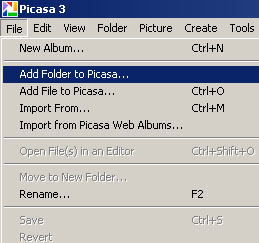
Go to File -> Add Folder to Picasa
disable folder scanning, add folder to picasa
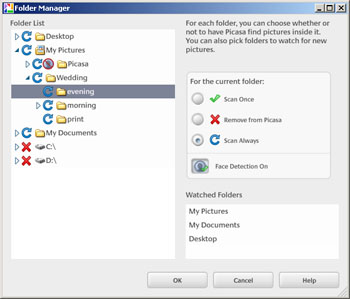
Folder manager will pop up and now you can select which folder to perform the scanning whenever picasa start.
To cancel scan for a folder, just Highlight the folder name and click “Remove from Picasa” and u’ll see the folder will be mark by a red cross. and this folder will not be scan by picasa from now on.
picasa stop folder scanning, picasa stop scan first time

Thursday, January 13, 2011

What is Google Search History? How to delete it from your account?

Many of the Internet users are confused with the two similar terms 'Internet browsing history' and 'Google search history'. The Internet browse history will be saved on your web browser and can be viewed by pressing [Ctrl] + [H] buttons together. Google Search history is the record of google searches you have made while you are logged in your google account. Internet browsing history will be deleted by clearing the saved history in your browser but google search history will remain. To see and delete google search history, you need to log on to your google account.

Steps to view your google search history


To see your google search history for a particular google account follow the steps below.

1. Log on to respective google account

2. Click on google account settings

3. Click on web history


Now the google search history page will be displayed.


How to see google search history for a google account
Some times you may prompted to re-login to your account to see this page.


Steps to remove google search history from your account


To delete the google search history follow the steps below.

1. Click on Remove items

2. Now check the items you need to remove and press Remove button.


Now google search history will be successfully removed from your account.

Coming Soon: 16 MP Camera in Smart Phone


If you look at the batches of new cell phones Japan’s leading mobile carriers have been presenting in recent months, you’ll notice the high-quality cameras some of the models have. And now major Japanese chip maker Renesas (which merged with NEC last year) is even promising [JP] 16MP cameras in future handsets.

The company claims its new image-processing system chip, the CE150, will make it possible to produce 16MP phone cameras for the first time, up from the maximum 13MP that are currently available. Renesas says the new chip paves the way to five times faster continuous shots, too.

Users will also be able to shoot full HD video (Renesas unveiled a full HD video processor for cell phone cameras as early as December 2008).

The chip will be mass-produced as early a March, with Renesas planning to churn out 1 million units monthly. Sample units are already available for $48 apiece.

Wednesday, January 12, 2011

HOW TO VIEW PASSWORDS BEHIND ASTERISKS ??


Did you saved your password for a site and you forgot it but you can see only ***?

Fortunately it is very easy to see your password.
How??? I will tell you how to Get that!!

~~::STEPS::~~
  1. Copy the JavaScript code.
  2. Open the site in a new browser window or tab.
  3. When you see the asterisks **** appear then paste the below JAVA code in the address bar and hit enter.
You should now see your forgotten password...!! Isn't that Amazing???

The JavaScript Code is only for Blog Members.
To get the script Follow the Blog ->write your e-mail id in comments.
You will be mailed the JavaScrpit Code.
If already a follower Sign In from Follow Section & write the e-mail id in comments.

Tuesday, January 11, 2011

Samsung develops DDR4 Ram (memory)


DDR3 has just picked up from where DDR2 left. It’s going big and fast and cheap too, which the public needs. However, Samsung has not been chillaxing behind, as the firm has made announcement of a DDR4 DRAM stick that can perform read and write operations using up to 40 percent less power than the old/current DDR3 stuff.

Bandwidth maxes out at 2.13Gbps at 1.2V, while Pseudo Open Drain technology assists in minimizing the battery impact. Over time, Samsung projects the new DRAM modules will hit 4Gbps speeds. It’s working away with server makers right now in order to achieve JEDEC certification, but the target market will clearly be laptops and other mobile devices, where energy-frugal memory like this would best be appreciated.

While they may be getting JEDEC certification this can actually take years to go into mainstream so such announcement will not bother the market of DDR3 in anyway actually. Remember back when DDR3 was announced, it took quite some time to land too. But this DDR4 will be great for server market, where the 40 percent less power consumption will be very obvious when it comes to huge memory.

Rumour of X68 board surface


Here’s something that Zol.com.cn claimed to be the new LGA2011 high-end CPU socket that Intel will be launching probably at the end of the year. The three photos were heavily blurred for obvious reasons, and you can’t really say that they’re fake because they do have very unique layout which matches what the site says.

Here’s the thing. The Intel X68 Express will be using new LGA2011, which means bye-bye to X58 and LGA1366. Yes, screw Intel for that. Anyway, they’re going to be offering new high-end and enthusiast-grade processors that feature 6, 8, or 12 cores, and quad-channel DDR3 memory controllers. Yes, quad-channel rams. The LGA 2011 is huge ass, its retention clip looks to be completely detachable by unhooking the retention bars on either sides. The socket seemed to be placed in the middle of the board due to its size, which should provide good clearing for after-market coolers, but still not necessary for such awkward placement.

Also, since the processor has four DDR3 memory channels, there’s room for only one DIMM per channel on a typically-sized ATX motherboard. We can see that there are two DIMM slots on either sides of the socket, which makes it rather awkward, not necessary despite having quad-channel rams. I won’t say they’re pursuing aesthetic look, but it’s hard to say.
With this platform, Intel transferred the North bridge component completely to the CPU package, much like LGA1156/LGA1155. Therefore, the 32-lane PCI-Express controller is housed inside the CPU package. That’s very packed indeed. What remains of the chipset is a PCH (platform controller hub). Like P55/H55/P67/H67, the X68 is a PCH, a glorified South bridge. It will house a smaller PCI-E hub that handles various connectivity devices, a storage controller, a LPCIO controller, USB and HDA controllers, and the DMI link to the processor. We will get to know more about this platform as the year progresses. X58 is using QPI link while P55 and P67 is using DMI, so I’m not sure which Intel is opting, as various sites has stated that this X68 is using DMI link.

Monday, January 10, 2011

Google's Calculator

Using the Google calculator you can perform standard and advanced scientific functions. Google's built-in calculator can solve your routine mathematical problems for example (simple Arithmetic function, Trigonometric, Inverse trigonometric, Hyperbolic and Logarithm functions). One important feature of this calculator to evaluate the Constants values, units of measurement and currency conversion also.


Follow these examples with different type of calculations:

Arithmetic Function
First open the Google.com and type the value like 100+500-10= in search box and press search button to show the result.


Logarithm Functions
To calculate logarithm base 10 values, type log (100) in search box and press search button to show the result.

Advanced Math Function
To calculate cos90 value, type cos(90) in search box and press search button to show the result.

Currency Conversion
To convert the 100 USD in Indian Rupees, type 100 USD in INR and press search button to show the result.

Sunday, January 9, 2011

Hidden Internet Browser in your Windows XP

There is a hidden internet browser in the HTML Help Component, accessible from a variety of places.


One such place is the standard calculator. Open thecalculator by clicking:


Start


All Programs


Acessories


Calculator


<then>


Help


Help Topics

If you then click to the far left of the title bar, you’ll see an option to Jump to URL… – take that. Type in the URL of the website you want to visit, but note that you need to supply the “http://” part or this will not work.

Hey presto – a browser in the right hand pane of the help program. This is Internet Explorer embedded inside the HTML Help application. You may find that Adobe Flash doesn’t work in your hidden browser.

Microsoft Windows Bugs or Magic???

MAGIC #1
An Indian discovered that nobody can create a FOLDER anywhere on the computer which can be named as “CON”. This is something pretty cool…and unbelievable… At Microsoft the whole Team, couldn’t answer why this happened!
TRY IT NOW ,YOU WILL NOT BE ABLE TO CREATE CON” FOLDER.


MAGIC #2
1.) Open an empty notepad file

2.) Type “Bush hid the facts” (without the quotes)
3.) Save it as whatever you want.
4.) Close it, and re-open it.
is it just a really weird bug? ?


MAGIC #3
This is something pretty cool and neat…and unbelievable… At Microsoft the whole Team, including Bill Gates, couldn’t answer why this happened!


It was discovered by a Brazilian. Try it out yourself…
Open Microsoft Word and type
=rand (200, 99)
And then press ENTER
then see the magic………………………….


MAGIC #4

GOTO NOTEPAD
TYPE “Q33N”. NOW CHANGE THE FONT SIZE TO 72 AND CHANGE THE FONT TO “WINGDINGS”.
NOW SEE THE MAGIC. FOR 11/9 WTC ATTACK, THE PLANES THAT CRASHED-ONE HAD THE NUMBER “Q33N”.

Friday, January 7, 2011

Speed up Start Menu in Windows


The Start Menu can be leisurely when it decides to appear, but you can speed things along by changing the registry entry

1.Open registry go to Start->Run->type regedit


2.HKEY_CURRENT_USER > Control Panel > Desktop > MenuShowDelay
 
3.from the default 400 to something a little snappier like 0.

4.Restart PC. 

Fix "can't open the hard disk drive by double click"

 
It happens because the virus have infected your windows system and it prevents you to open the hard drives by double clicking it...Don't worry,the problem will be solved in no time..

1.First, go to start > run > type cmd and press enter.This wil open the windows command prompt.
2.In the command prompt,type cd\
3.Type attrib -r -h -s autorun.inf
4.Type del autorun.inf.
5.Restart your PC and the problem solved but if you have more than 1 partitions,continue as follows:
now type d: and press enter for d: drive partition. Now repeat steps 3, 4 and 5 for all your hard disk partition.

Alternative option:
1.If you can see the hidden operating system files,this will be very easy.Just open your c: drive by typing c:\ in the address bar & just delete the autorun.inf. 
2.Then,restart the PC.

Thursday, January 6, 2011

Is YOUR ANTIVIRUS WORKING ????


This is small and working Trick To Check Ur Antivirus Is Working Properly


Open notepad
Copy this code in the text file....

"X5O!P%@AP[4\PZX54(P^)7CC)7}$EICAR-STANDARD-ANTIVIRUS-TEST-FILE!$H+H*"

(without qutoes)

then save it with the name fakevirus.exe

Now try to open it if this file got deleted immediately or antivirus error occurs...
that means ur antivirus is working n updated...

tRY iT now ....!

Wednesday, January 5, 2011

Recover Hacked facebook Account


These days there are many ways a facebook account can be hacked easily and many people are falling victims to these hackers. Its very easy to get trapped by hackers, they use more sophisticated methods to do it. And are you in such a situation? Did some one hacked your facebook account ?

There should be any thing to worry if it is yes. Before losing hope there are some things that can be done to get your Hacked Face Book Account Back.

First of all you can try resetting your account password on facebook. But this could help only in rare cases, because most hackers are intelligent and they surely will have changed the default email address. But if some body have accidentally (though the chances are extremely narrow) logged into your account and has changed only the password of your face book account, this might help you in recovering your account password and gain access to your compromised account.

But things get much more worse when the hacker changes the email address in your Face Book Account. You’ll no longer be able to reset the account password and gain access to the account.

But there is a way.

Face Book provides a contact page for you to help you to in recovering the hacked account .

Visit:-
http://facebook.com/help/contact.php?show_form=account_compromised

Inside the contact Form You need to Fill in the Following Details Correctly.

Full name on the account:

Enter the Full Name as you have given in Your Face Book Account.

Network(s) the account belongs to:

Enter the names of the networks you have joined. Include as many as possible.

Email addresses that may be affiliated with the account:

This is the email address you used as username to login to face book.

Your contact email address:

Enter a email address you can be contacted by facebook. They will contact you regarding this issue.

URL (web address link) of the profile page:

Give the link to your facebook profile address.

Description and steps to reproduce the issue:

Provide as much as information in here regarding how your face book account was hacked etc. It is recommended to include the time and date when you were able to access your account for the last time.
Newer Posts Older Posts Home